




 USD
USD EUR
EUR GBP
GBP CAD
CAD AUD
AUD HKD
HKD JPY
JPY KRW
KRW SGD
SGD NZD
NZD THB
THB TWD
TWD English
 繁體中文
繁體中文 日本語
日本語 한국어
한국어 ไทย
ไทย Bahasa Indonesia
 Français
 Español
 Deutsch
 Português
 Nederlands
 Tiếng Việt
By EVPADPro | 11 July 2024 | 0 Comments
How to Watch Disney+ Smoothly On The TV Box Unblock UBox11?
Disney+ and Netflix are two of the most popular video streaming platforms and the most popular ones. Some users might find issues when streaming them on their Android TV boxes. It's neither the broken services nor the broken TV boxes because you can fix the issues by doing this.
First of all, go to the homepage of Disney+.

Secondly, press left, and find Settings which is at the bottom.

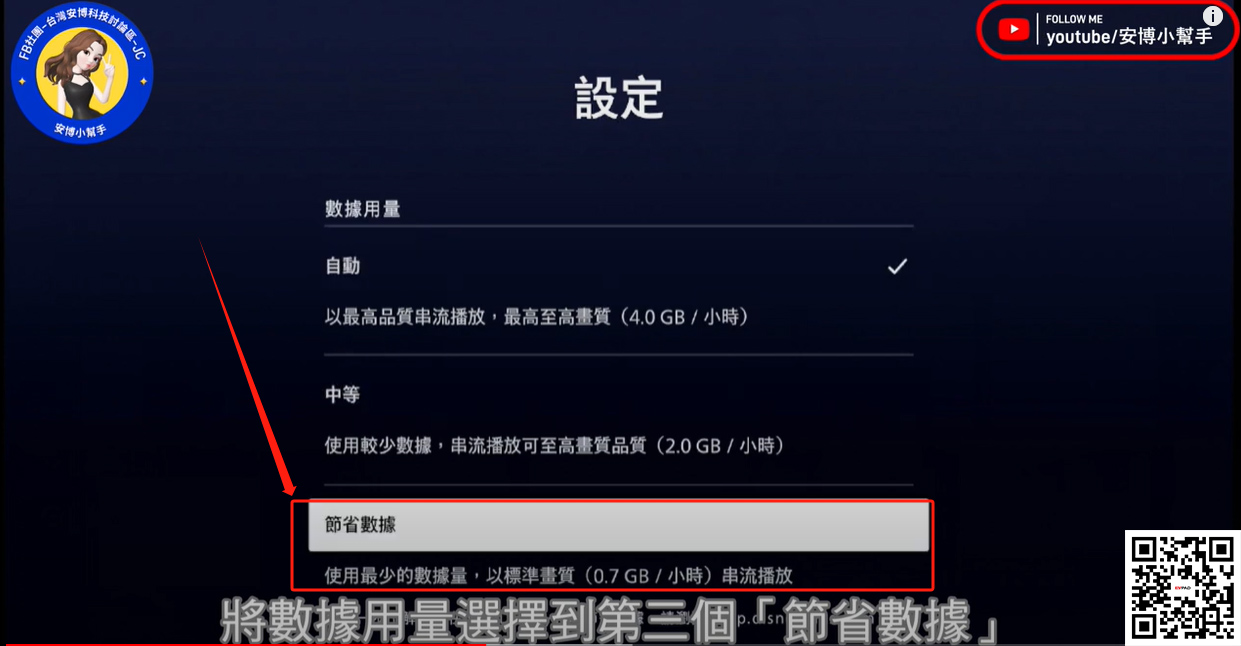
Thirdly, find the data usage, and turn on the last one which is saving mode. Now, go back to test the video playing, it shall be playing smoothly now.
Not only can you do this on the TV box Unblock UBox11, but you can also do it on all of our TV boxes to achieve smooth running Disney+.
First of all, go to the homepage of Disney+.
Secondly, press left, and find Settings which is at the bottom.
Thirdly, find the data usage, and turn on the last one which is saving mode. Now, go back to test the video playing, it shall be playing smoothly now.
Not only can you do this on the TV box Unblock UBox11, but you can also do it on all of our TV boxes to achieve smooth running Disney+.



